Skip to content
CTS Field Notes

CTS Field Notes

Ideas, observations, and useful links from CTS Companies.

Clear, evidence-based explorations of everyday technology decisions and the larger systems behind them. Written for curious readers who want more than a checklist.

Three Ways Small Businesses Can Approach AI

For many small businesses, AI feels both important and frustratingly vague.

Owners and managers hear constantly about what AI is capable of. They see demonstrations, read headlines, and watch larger companies invest heavily in it. But the practical question is much harder:

How do we actually figure out where AI fits in our business?

For a small business, that usually requires bringing together three things:

Knowledge of the business. Knowledge of AI. The ability to implement.

The problem is that those three things rarely exist in the same place.

Broadly, I think small businesses have three ways to approach the problem.

1. Figure it out internally

The first option is to learn about AI yourself and look for opportunities inside the business.

This approach has one major advantage: you know your business better than anyone else.

You know which processes are inefficient, what employees spend too much time doing, where customers get frustrated, and which tasks have always been harder than they should be. An outside person may need weeks of conversations just to uncover things that are obvious to you.

The challenge is AI knowledge.

Someone inside the company has to understand enough about what AI can do to connect those business problems with possible solutions. Then someone has to actually build, configure, integrate, and maintain whatever you decide to use.

For a 20-, 50-, or even 100-person company, that can be difficult. There may not be anyone whose job it is to experiment with AI, and the people capable of doing it usually already have plenty of other responsibilities.

Advantages: Deep knowledge of your own business, greater flexibility and control, and the potential to create something highly specific to the way you operate.

Tradeoffs: Requires time, curiosity, AI knowledge, technical ability, and someone willing to own the project through implementation.

2. Bring in outside AI expertise

The second approach is to hire someone to help.

A good consultant or outside firm can bring something most small businesses don’t have internally: a broader understanding of what AI can currently do.

They may have seen similar problems in other companies and can help identify opportunities you wouldn’t have recognized yourself.

But the knowledge imbalance works in the opposite direction.

They understand AI. You understand your business.

So a significant part of the process becomes transferring enough knowledge about your company to the outside firm for them to make useful recommendations.

There is also an important distinction between identifying an opportunity and implementing it.

It is relatively easy to produce a list of ideas for how a company might use AI. It is much harder to redesign a workflow, connect systems, train employees, handle security concerns, and make the new process actually work every day.

That doesn’t make consulting a bad approach. It just means businesses should understand what they’re buying. A strategy report and a working solution are very different things.

Advantages: Access to AI expertise, outside perspective, and potentially much faster identification of useful opportunities.

Tradeoffs: Cost, the time required to teach someone your business, and the possibility that implementation becomes a much larger project than identifying the idea.

3. Use something someone else has already figured out

The third path is increasingly interesting: use a packaged AI-enabled product or service.

This could be entirely new software, an AI-enabled service, or simply a new capability inside software you already use.

In this case, someone else has already done much of the work.

They identified a specific problem. They determined how AI could help solve it. And, importantly, they built a product or service you can evaluate. You still have to check its fit, data handling, integrations, and implementation requirements.

Instead of asking:

“How could we use AI to solve this?”

you’re asking:

“Is this already-solved problem important to our business?”

That’s a very different question.

Imagine a product built specifically to automate one narrow accounting, customer service, sales, legal, or administrative workflow. The company behind it doesn’t need to understand everything about your organization. It needs to understand that particular problem extremely well.

If the problem matches yours and the product works as claimed, much of the difficult AI work may already have been done.

Potential advantages: Faster adoption, easier implementation, lower internal expertise requirements, and lower cost than building something custom, depending on the product and workflow.

Tradeoffs: Less customization and control. You’re largely accepting someone else’s definition of the problem and their way of solving it. And, of course, the solution is only valuable if the problem it solves is actually important to your business.

There isn’t a universally right answer

These three approaches aren’t mutually exclusive.

A company might use packaged AI tools for several straightforward functions, work internally on something unique to its business, and bring in outside expertise for a particularly complicated opportunity.

And each approach involves tradeoffs.

The table is a rough comparison, not a promise about any particular project. Integration, sensitive data, and unusual workflows can change the cost and effort.

Approach Business Knowledge AI Knowledge Implementation Effort Customization Typical Speed
1. Figure it out internally High Must develop internally High High Slower
2. Bring in outside expertise Must be transferred High Medium to high High Medium
3. Use a packaged solution Needed mainly to judge fit Built into the solution Lower Lower Faster

The ideal situation would be someone who understands your company deeply, understands the rapidly changing capabilities of AI, and can implement the solution economically.

For most small businesses, that person or team doesn’t exist.

So the more useful question may not be:

“What should our AI strategy be?”

It may be:

“Which parts of this do we want to figure out ourselves, which parts should we get help with, and which problems has someone else already solved for us?”

For many small businesses, answering that question is probably a much more practical place to start.

Permalink

Before You Change HVAC Contractors

Before You Change HVAC Contractors

When you replace an HVAC contractor, put the building’s login credentials on the handover list alongside maintenance records, warranties, and the date of the next service visit.

Ask the outgoing company to identify every way it can reach the system. That might include a manufacturer’s portal, a remote connection to a computer in the building, or an administrator account used by its technicians. Find out who controls those accounts and what has to happen for the incoming contractor to take over.

Do this while everyone is still answering the phone.

A contractor change is a useful time to work through these details because the people involved have an immediate reason to cooperate. Someone needs to accept responsibility for the equipment. Someone needs to demonstrate that it works. Access belongs in that conversation.

Find out whose account it is

Consider a possible arrangement: a contractor installed a heating-control system several years ago and registered the management portal using an employee’s email address. The customer pays for the service and owns the equipment, but password resets go to the contractor’s employee.

The arrangement may have worked perfectly well. Trouble begins when the employee leaves, the contractor changes, or the customer needs to make an adjustment without calling for help.

Before the handover, establish whether the business has its own administrator access, who receives recovery messages, and whether the manufacturer requires a formal transfer. Ask the incoming contractor to explain any account or subscription it expects to control.

A leased building adds another conversation. The property manager may own the system, while the tenant depends on its operation. In that case, the tenant needs a named contact, an escalation route, and a clear account of who can authorize changes. Buying another service contract will not settle those responsibilities.

The same exercise applies to badge readers, cameras, alarm notifications, and environmental monitors. Each may have a different installer, portal, and support arrangement. Start with the systems whose failure would interrupt work or affect access to the building.

Test the handover before closing it

A list of usernames is a poor substitute for watching the new arrangement work.

Have the incoming provider demonstrate an authorized routine task with the person responsible for the building. Depending on the equipment, that could mean reviewing a schedule, retrieving a configuration backup, or checking where a notification goes. Confirm that the business can reach support and that recovery messages arrive at an address it controls.

Then review the old access. Individual accounts, shared credentials, remote-support software, and manufacturer permissions may need different treatment. A password change in one portal does not tell you whether a separate remote connection remains available.

Coordinate removals with the people responsible for operating the equipment. Abruptly disabling an account can create its own problems if it supports an integration or an essential service. Record what was removed, what remains, and the reason for any temporary exception.

NIST’s September 2026 draft of its Guide to Operational Technology Security provides context for this work. It includes building automation and physical-access systems within operational technology and addresses security alongside the equipment’s reliability and safety requirements. The draft also expands guidance on asset management and protection of system-management functions. It remains a draft open for public comment.

For a smaller business, a contractor handover is a manageable opportunity to put that thinking into practice. Facilities knows how the equipment behaves. The contractor knows how to service it. IT can help examine accounts, authentication, and network access. Bring those people together around a specific system and a specific change.

Keep the resulting record with the service agreement. Include the equipment and location, account owner, support contacts, access methods, and the date the transfer was tested. Store passwords in the organization’s approved password manager.

Before closing the job, ask the person responsible for the building to explain what they would do if the system stopped responding tomorrow morning. They should be able to find the right contact, reach the necessary records, and describe any approved manual fallback. If the answer still depends on calling the former contractor, there is another item to finish.

NIST SP 800-82 Rev. 4, Guide to Operational Technology Security, initial public draft

Permalink

A Patch Can Be Done Before Its Data Is Gone

A security team can truthfully say a patch is deployed and still have important work left to do.

That sounds obvious until an incident update arrives with the reassuring word remediated. The word is doing several jobs at once. It can mean the vulnerable code changed. It can mean the change reached production. It can mean old data was removed. It can mean someone looked for evidence that the flaw was used. Those are related facts, but they are not interchangeable.

Cloudflare’s September disclosure of a cross-tenant data-exposure vulnerability in its Containers product is a useful recent example. The company said a researcher reported the issue through its bug-bounty program, that it fully remediated the vulnerability, and that it had no evidence customer data was compromised. The technical details matter to affected users. The management lesson is broader: a sound closure statement has to answer more than “did we ship a patch?”

The four questions hidden inside “fixed”

First: What changed? A remediation begins with a specific control, code path, configuration, or process change. Vague language makes it impossible for another person to judge whether the stated fix addresses the actual condition.

Second: Where is the change active? A fix in a repository, a staging environment, or a newly created tenant is not automatically a fix everywhere it needs to be. Rollout status should name the scope: production systems, regions, versions, integrations, or other boundaries that matter.

Third: What legacy state remains? Some problems leave behind old snapshots, caches, tokens, records, permissions, or derived data. A code correction can stop a condition from recurring without changing material that already exists. Cleanup is its own workstream, with its own evidence.

Fourth: What did the review find? “No evidence” is not the same as “it definitely never happened.” It is a statement about the evidence available after a defined investigation. That is honest language when it is paired with the scope and method of review rather than used as a magic eraser.

Turn a status update into a decision record

For a smaller organization, the practical artifact can be a short table: condition, owner, systems in scope, action taken, verification performed, remaining uncertainty, and next review date. It is not bureaucracy for its own sake. It prevents a future investigator, auditor, or new technology partner from having to reconstruct what “fixed” meant in a rushed meeting.

It also makes escalation clearer. A rollout gap belongs with the deployment owner. A retained backup or log question belongs with the owner of that service. A question about possible exposure belongs with the people who can examine evidence, not with the person who happened to apply the patch. One label should not erase those handoffs.

Why this matters outside a cloud provider

Most organizations will never investigate a container-storage flaw. They will, however, replace a compromised account, revoke a vendor connection, patch a server, close an exposed share, or change a payment process. Each action can produce a premature feeling of completion.

The better closing question is not simply, “Was the fix applied?” It is, “What condition stopped, what old state was checked or removed, and what evidence supports our conclusion about impact?”

That question is useful because it assigns work. The person who deploys a patch may not own backup retention. The person who revokes a credential may not own audit logs. The person who communicates with leadership may need a clear boundary between verified facts and remaining uncertainty.

A completed patch is good news. It just should not be asked to carry the whole meaning of recovery, accountability, or future confidence over time.

Permalink

The Invoice Is Not the Test

The Invoice Is Not the Test

A professional-looking invoice lands in an inbox. It has the right tone, a familiar logo, perhaps even a name someone recognizes. The first question is usually visual: does this look legitimate?

That question is understandable, but it is not the one that protects a business. The better question is: does this request belong in an expected business process?

Modern phishing is often designed to pass a quick visual inspection. A convincing invoice, a security notice, or an urgent executive request may look entirely ordinary. The useful defense is not becoming a forensic email analyst before lunch. It is having a simple way to verify an unusual request without relying on the request itself.

Verification should use a path the request does not control

The common thread is simple: use a known route outside the email, text, or call that created the urgency. A process that relies on replying to the same message, clicking the same link, or calling the phone number supplied by the requester is not really independent verification.

  • Invoice or payment request: Confirm through a known vendor contact, vendor portal, or independently verified phone number—not the email thread.
  • Security alert: Open the actual product or service directly through a bookmark, app, or known URL. Do not use the alert’s link to find out whether the alert is real.
  • Payment-detail change: Require out-of-band confirmation with a known contact before changing banking information. FBI IC3 guidance specifically recommends a secondary channel for account-information changes.
  • Account-access request: Treat unexpected permissions, password resets, MFA changes, and device enrollment as high-risk events that need an owner and an independent check.
  • Urgent executive request: Confirm through a second channel before money, credentials, or sensitive data move. Urgency is a reason to verify faster, not a reason to skip verification.

This is less glamorous than teaching people to spot a suspicious font. It is also more durable. Brand styling changes. Attackers improve their writing. A known verification path remains useful.

Examples worth recognizing now

Several patterns are especially worth putting on a short “pause and verify” list: fake vendor invoices and payment-change notices; counterfeit security alerts using familiar product names; consent requests that open a real Microsoft or Google permission screen; and executive, support, or authority impersonation that leans on urgency. The goal is not to assume every unexpected message is malicious. It is to recognize the requests that should not be completed on trust alone.

The consent-request example deserves special attention. FBI IC3 warned in September that malicious actors can use OAuth consent phishing to direct a user to a legitimate provider’s permission screen for an application the attacker controls. If the user approves broad access, the attacker may obtain account access without stealing the password or defeating MFA. A real sign-in page is not proof that the requested application is safe.

AI raises the same underlying problem. It can help impersonators make a message, call, or video seem more persuasive, but it does not change the response: verify identity and the requested action through an independent route. IC3’s recent impersonation warnings emphasize that urgency, spoofed identities, and new technologies can be used to manufacture credibility.

A low-friction verification habit is a security control

The practical goal is not to make employees afraid to act. It is to make the safe action easy. A company should know who can verify a vendor payment change, where staff should check a suspicious service alert, and which second channel is available when a senior person sends an unexpected request.

That is a better security program than asking everyone to trust their instincts. An invoice is not the test. The test is whether the request survives the normal business process that was already supposed to protect the company.

Sources

Permalink

A Token Is a Key That Can Travel

A password feels personal. A token often does not.

That difference is one reason tokens are easy to overlook. An employee signs in once, a browser or application receives the right artifact, and work continues without another prompt. The experience is supposed to feel unremarkable. That is the convenience of single sign-on and modern cloud applications.

But an access token is not merely a receipt proving that someone typed a password earlier. In the systems NIST describes, tokens and related assertions can carry identity and authorization information used to reach applications, APIs, and other resources. In practical terms, a token can function like a key that travels: it may be short-lived, limited in scope, and cryptographically protected, but it can still be valuable if it is stolen, replayed, or accepted when it should no longer be trusted.

The useful question is not only “Is MFA on?”

MFA is still valuable. So are strong passwords, managed devices, and a competent identity provider. None of those answers the whole token question.

NIST’s newly finalized guidance on protecting tokens and assertions puts attention on key management, token verification, and lifecycle controls. The report is aimed chiefly at federal agencies and cloud service providers, not as a drop-in rulebook for every small business. Its underlying division of labor is still useful: somebody has to configure the service securely, and somebody has to decide how the organization will use, limit, observe, and recover access.

That is where a token becomes an operating question. A provider may control part of the platform, while the customer controls which applications are approved, which devices may hold sessions, which integrations receive access, and who can respond when an account or device is no longer trustworthy. “The vendor handles security” is not a complete description of that arrangement.

Give the token a life cycle

The clearest way to make this less abstract is to treat a token like any other access capability with an owner and an end date. Not every product exposes the same controls, and organizations should use the controls their providers actually document. Still, the questions travel well:

  • Where can this access capability live? A managed browser, a mobile app, an automation, and a shared workstation do not present the same risk or recovery problem.
  • How long should it remain useful? Longer sessions reduce friction, but they can also lengthen the period in which a lost or misused artifact matters.
  • What is it allowed to reach? A token intended for one application or workflow should not quietly become a broad substitute for a person’s entire identity.
  • How is it revoked? When an employee leaves, a device disappears, or an integration changes hands, someone should know which session, application consent, credential, or connection has to be cut off.
  • Who would notice something strange? Logging and monitoring do not prevent every misuse, but they make it possible to investigate whether an ordinary sign-in became an unusual access pattern.

These are not five settings to copy from a standards document. They are five ownership questions. A 25-person company might answer them through Microsoft 365 administration, device management, a password manager, an integration inventory, and an offboarding checklist. A larger organization may spread the work across security, infrastructure, and application teams. The important thing is that the answer is visible.

Convenience is not the enemy

Modern work depends on tokens because asking people to re-enter credentials every few minutes would be miserable and would encourage worse behavior. The goal is not to make every session fragile. It is to know what the convenience mechanism is doing and what happens when its assumptions change.

That is the small shift worth making. A login event is not always the end of an identity decision; it can be the beginning of a portable chain of access. Once an organization sees that chain, questions about device ownership, app approval, offboarding, incident response, and vendor responsibility stop looking like separate chores. They are all ways of deciding who can say yes, for how long, and how the answer can be withdrawn.

Sources

Permalink

Three Clouds Can Still Have One Failure Domain

Three cloud logos on an architecture diagram can look like resilience. Sometimes they are. But a logo count is not a dependency map.

NIST’s newly published draft on multi-cloud architecture describes a familiar problem in unusually direct language: when services span providers, it can be hard to identify system boundaries, network architecture, and security processes. Its working group highlights identity and access management, telemetry, configuration and change management, data protection, and authorization as the areas where the seams become most visible.

That does not mean multi-cloud is a mistake. It means “we use more than one cloud” is not an answer to the question a business actually has: what has to keep working for us to serve customers?

The common control plane hiding in plain sight

A practical multi-cloud design often relies on shared things. One identity provider may authenticate users into several services. One network team may manage the paths between them. One managed-service partner may hold the administrative knowledge. One security-monitoring workflow may be expected to see activity everywhere. One recovery plan may assume that the people, credentials, documentation, and vendor contacts needed to restore a service will be available.

Any of those can become a common failure domain. If a centralized identity service is unavailable, the applications may still be running but users cannot reach them. If a change-management process is inconsistent, moving a workload may reproduce the same configuration error in a different provider. If logs are collected unevenly, an organization can end up with two clouds and one blind spot.

NIST’s multi-location zero-trust guidance makes the identity point especially concrete: it shifts attention away from trusting a network location and toward explicit identities and authorization for users, services, and devices. In a multi-cloud setting, that can make the shared identity architecture more important, not less. A stronger front door is valuable; it is also a dependency worth testing.

Resilience is a question of independent recovery

The useful test is not “could this workload move?” It is “could we recover this service if a named dependency failed?” Name the dependencies: identity, DNS, network connectivity, privileged access, encryption keys, monitoring, backup locations, vendor support, runbooks, and the people authorized to make a disruptive decision.

Then ask which of them are truly independent. A backup in another cloud is helpful only if the credentials, keys, network path, restore instructions, and recovery authority do not all depend on the first environment. NIST’s recovery guidance similarly emphasizes understanding interdependencies when establishing recovery objectives; sometimes an identity or authentication service must be restored before the business service that seems more visible.

What to put on the next architecture review

For a 25- to 100-person organization, this does not require building a miniature hyperscaler. It requires an honest map and a small exercise:

  • List the shared identity, administration, network, monitoring, and recovery dependencies across each cloud service.
  • Assign an owner for each dependency and record who can act when that owner is unavailable.
  • Choose one plausible failure—an identity outage, lost privileged access, or a provider-management disruption—and walk through the first hour of recovery.
  • Test the assumptions that cross provider boundaries, especially access to backups, keys, runbooks, and vendor escalation paths.

Multi-cloud can create useful options. It does not automatically create independence. The important architecture question is not how many clouds are present. It is how many separate ways the business can still get back to work.

Permalink

Apple Business, Intune, and RMM: Three Parts of Managing One Device

A new Mac can arrive looking almost finished.

It came from an approved reseller. The employee has a Microsoft 365 account. Someone has access to Apple Business. Someone else has Intune. The IT provider has an RMM platform.

That sounds like a managed device.

It may be. But only if the organization can answer a less glamorous question:

Which system is responsible for what?

Apple’s business offering has recently been renamed Apple Business; it combines capabilities previously associated with Apple Business Manager, Apple Business Essentials, and Apple Business Connect. Apple’s documentation makes the naming change clear. The older “Apple Business Manager” name will remain familiar for a while, and people sometimes call the whole category “Apple device management.”

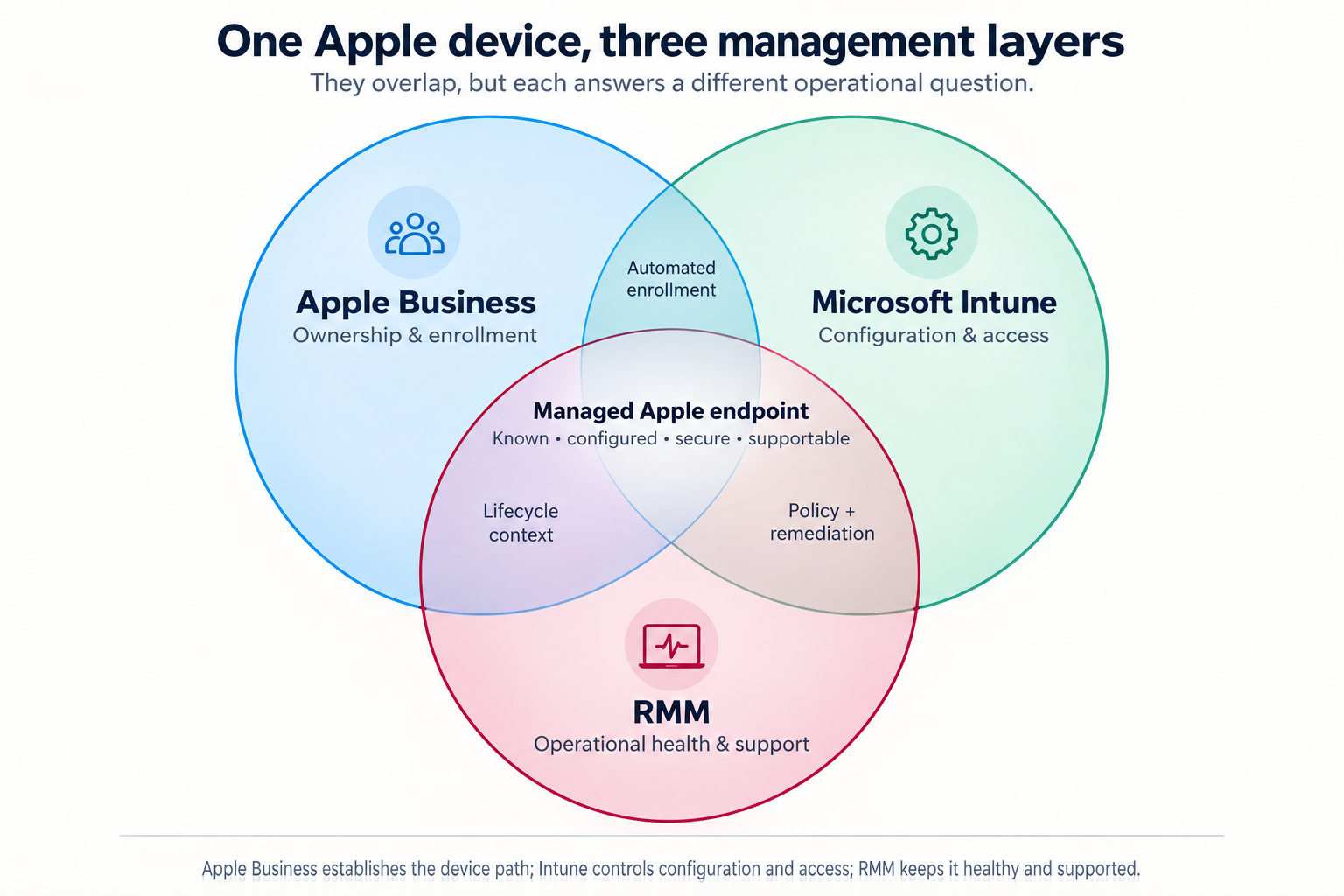
The important distinction is that Apple Business, Microsoft Intune, and an RMM can all touch the same Apple device—but they solve different problems.

Apple Business, Microsoft Intune, and RMM Venn diagram
The overlaps are conceptual; they do not mean every product has a direct technical integration with every other product.

*The overlaps in this diagram are conceptual. They do not mean every product has a direct technical integration with every other product.*

Apple Business: ownership, identity, and the enrollment path

Apple Business is the Apple-side organizational layer.

Its central role is to help the organization establish that a Mac, iPhone, or iPad is company equipment and direct it into an approved management process. Depending on the organization’s Apple configuration, its functions can include:

  • Assigning eligible devices purchased through Apple or participating resellers
  • Directing devices to a mobile-device-management service through Automated Device Enrollment
  • Managing organization roles and Managed Apple Accounts
  • Acquiring and assigning Apple apps and books
  • Connecting Apple identities with the organization’s identity environment
  • Apple Business answers:

    Does this device belong to the company, and where should it enter management?

    That is essential when a device is first issued, replaced, reassigned, lost, or retired. It reduces the chance that the business discovers too late that a “company Mac” is still effectively tied to a former employee’s personal Apple account.

    Apple Business may include Apple-native management capabilities depending on the subscription and configuration. But in a Microsoft 365-centered environment, it is usually best understood as the Apple ownership and enrollment foundation—not the complete answer to endpoint security or day-to-day support.

    Microsoft Intune: configuration, security, and access

    Microsoft Intune is a cloud endpoint-management service. Microsoft says it can enroll, configure, secure, and update devices; deploy and protect applications; and use compliance status in access decisions. It supports macOS, iOS, and iPadOS alongside Windows and other platforms. Microsoft’s Intune overview explains its connection to Entra ID and Conditional Access.

    For Apple devices, Intune can commonly handle:

  • Device-enrollment profiles and configuration policies
  • Encryption, password, screen-lock, and operating-system requirements
  • Deployment of business applications and settings
  • Compliance reporting
  • Certificates, Wi-Fi, VPN, and security configuration
  • Restrictions on device features or data sharing where appropriate
  • Conditional Access decisions for Microsoft 365 resources
  • Mobile application management for work data on personally owned devices
  • Intune answers:

    What must be true before this device can use company information?

    That question matters most when an employee signs in to Microsoft 365 from a Mac, iPhone, or iPad. Intune can help ensure the device meets the organization’s requirements before it reaches email, SharePoint, Teams, or other business systems.

    RMM: operational health and support

    An RMM—remote monitoring and management platform—is the operational layer. Exact features depend on the RMM product and the way an IT provider configures it, but its everyday responsibilities often include:

  • Monitoring device health, storage, performance, and alerts
  • Deploying patches or helping confirm patch status
  • Running maintenance and remediation scripts
  • Providing remote support
  • Maintaining hardware and software inventory
  • Generating service tickets and operational history
  • Identifying a recurring issue before it becomes another user complaint
  • An RMM answers:

    Is this device healthy, current, visible, and supportable today?

    Intune can perform some endpoint-management and remediation functions that overlap with an RMM. An RMM can report on conditions that matter to a compliance policy. The difference is emphasis: Intune is generally the stronger Microsoft identity, policy, and access-control layer; an RMM is generally the stronger ongoing service-operations layer.

    Where the overlap matters

    The systems should reinforce one another, not compete.

    | Overlap | Useful outcome | Decision to make |
    | ———————– | ———————————————————– | ——————————————————————————- |
    | Apple Business + Intune | Zero-touch enrollment and supervised device setup | Which MDM service receives Apple devices automatically? |
    | Intune + RMM | Security policy plus monitoring, remediation, and support | Which tool owns patching, and which one opens the ticket when it fails? |
    | Apple Business + RMM | Better asset and lifecycle context | Which system is the trusted record of company ownership? |
    | All three | A device that is known, configured, secure, and supportable | Who owns the full lifecycle when the employee leaves or the device is replaced? |

    The most common mistake is not selecting the “wrong” product. It is allowing two systems to be responsible for the same control—or assuming that one system handles a job it does not.

    For example, if Intune and the RMM both try to govern operating-system updates, the result can be conflicting timing, unclear reporting, or a support team unable to say which system failed. If Apple Business assigns a device but nobody verifies that Intune enrolled it, the company may own equipment that never entered its security baseline.

    A practical division of responsibility

    For many small and midsize organizations using Microsoft 365, a sensible model looks like this:

  • Apple Business: establish company ownership, Apple identities, app licensing, and automated enrollment.
  • Intune: apply device configuration, security standards, application controls, and Microsoft 365 access requirements.
  • RMM: monitor health, automate routine maintenance, deliver support, and preserve operational history.
  • The details will vary. A company with only a few iPhones may need a lighter model. A professional-services firm with managed Macs, remote employees, regulated information, and Microsoft 365 may need all three layers working together.

    The goal is not to collect dashboards. It is to make sure a business-owned Apple device has a clear path from purchase, to enrollment, to secure use, to support, to retirement.

    Ask about any company Mac, iPhone, or iPad:

  • Can we prove it belongs to us?
  • Can we confirm it meets our access and security requirements?
  • Can we see whether it is healthy and support the person using it?
  • Can we recover or retire it without depending on one employee’s memory?
  • If those questions have clear answers, the device is managed.

    If the answer is, “We have an Apple portal somewhere, and our IT company can probably see it,” the organization may have software—but not yet a device-management model.

    Permalink

    When a Price Becomes a Data Flow

    A price used to look like a small fact. It sat on a shelf, in a catalog, or in a quote, and the difficult questions were mostly commercial: Is it competitive? Is it profitable? Who approved the discount?

    Now a price can be the final output of a much larger system. It may reflect inventory, location, time, a promotion, a customer segment, browsing behavior, purchase history, or data supplied by another company. The number may still fit on a price tag. The decision that produced it may not.

    In January 2025, the Federal Trade Commission published initial staff findings from an ongoing surveillance-pricing market study. The study examined how intermediaries can use personal and behavioral data in tools that influence the prices or promotions consumers see. It was not a final rule, an enforcement policy, or a finding about every retailer. It was an early look at a system that deserves clearer questions.

    The broader operational question is simple: if data helps produce a price, can the organization explain the data flow behind it?

    A price is no longer only a pricing decision

    Consider the ordinary-sounding instruction, “show a better offer to likely buyers.” That may require a customer profile, a segmentation rule, a model or rules engine, a channel where the offer appears, an experiment log, and a decision about whether the customer sees the same offer elsewhere. It may also require information from a retailer, an advertising platform, a loyalty system, or a third-party data provider.

    At that point, pricing has become a workflow. And workflows need owners.

    The FTC’s initial staff perspective described inputs such as location, demographics, browsing patterns, shopping history, and interactions such as mouse movements. The study did not establish that every retailer uses every input, nor does it convert every variable price into misconduct. It does make one management problem harder to ignore: a business can create a consequential customer-facing decision without anyone being responsible for the whole chain.

    The three questions behind the number

    First: what data enters the pricing decision? A location used to estimate delivery cost is not the same thing as a browsing history used to infer willingness to pay. An organization should be able to name its inputs and their sources without relying on the phrase “the platform does that.”

    Second: what rule turns those inputs into an offer? The rule may be a simple promotion table, a vendor feature, or a more complicated model. The important distinction is not whether it feels technical. It is whether someone can describe the purpose, limits, and exceptions well enough to test the result and answer a reasonable customer question.

    Third: who can explain the outcome? Marketing may own the campaign. Sales may own the discount authority. Finance may own margins. IT may manage the systems and integrations. Privacy or legal may review the data use. If nobody owns the explanation across those boundaries, the organization has not merely delegated a task; it has delegated accountability into a hallway.

    Transparency is an operations requirement

    People sometimes hear “transparency” as a copywriting project: add a sentence to a policy page and continue enjoying lunch. But a disclosure can be accurate only if the underlying process is understood. A customer-facing explanation depends on records of what data was used, what vendor or system processed it, what version of a rule applied, and who approved the program.

    That is not an argument for documenting every routine price adjustment like a space launch. It is an argument for matching documentation to consequence. A standard wholesale price list needs ordinary controls. A system that changes an individual customer’s offer based on personal information deserves a clearer inventory, an accountable owner, a review path, and a way to investigate an unexpected result.

    Start before the pricing tool arrives

    The useful preparation is not a grand policy that tries to forecast every algorithm. It is a short working map. List the pricing and offer systems already in use. Identify what customer or behavioral information enters each one. Record which team owns the business purpose, which team owns the technical connection, and who can approve an exception. Then ask a practical test question: if a customer asks why this offer appeared, can we give a truthful explanation without reverse-engineering our own process?

    The FTC’s study remains ongoing, and its initial findings should not be described as a final rule or universal finding about retailers. Its value as an operational prompt is available now. When a price becomes a data flow, the number is only the visible part of the decision. The organization still has to own the rest of it.

    Permalink