Skip to content
CTS Field Notes

CTS Field Notes

Ideas, observations, and useful links from CTS Companies.

A Token Is a Key That Can Travel

A password feels personal. A token often does not.

That difference is one reason tokens are easy to overlook. An employee signs in once, a browser or application receives the right artifact, and work continues without another prompt. The experience is supposed to feel unremarkable. That is the convenience of single sign-on and modern cloud applications.

But an access token is not merely a receipt proving that someone typed a password earlier. In the systems NIST describes, tokens and related assertions can carry identity and authorization information used to reach applications, APIs, and other resources. In practical terms, a token can function like a key that travels: it may be short-lived, limited in scope, and cryptographically protected, but it can still be valuable if it is stolen, replayed, or accepted when it should no longer be trusted.

The useful question is not only “Is MFA on?”

MFA is still valuable. So are strong passwords, managed devices, and a competent identity provider. None of those answers the whole token question.

NIST’s newly finalized guidance on protecting tokens and assertions puts attention on key management, token verification, and lifecycle controls. The report is aimed chiefly at federal agencies and cloud service providers, not as a drop-in rulebook for every small business. Its underlying division of labor is still useful: somebody has to configure the service securely, and somebody has to decide how the organization will use, limit, observe, and recover access.

That is where a token becomes an operating question. A provider may control part of the platform, while the customer controls which applications are approved, which devices may hold sessions, which integrations receive access, and who can respond when an account or device is no longer trustworthy. “The vendor handles security” is not a complete description of that arrangement.

Give the token a life cycle

The clearest way to make this less abstract is to treat a token like any other access capability with an owner and an end date. Not every product exposes the same controls, and organizations should use the controls their providers actually document. Still, the questions travel well:

  • Where can this access capability live? A managed browser, a mobile app, an automation, and a shared workstation do not present the same risk or recovery problem.
  • How long should it remain useful? Longer sessions reduce friction, but they can also lengthen the period in which a lost or misused artifact matters.
  • What is it allowed to reach? A token intended for one application or workflow should not quietly become a broad substitute for a person’s entire identity.
  • How is it revoked? When an employee leaves, a device disappears, or an integration changes hands, someone should know which session, application consent, credential, or connection has to be cut off.
  • Who would notice something strange? Logging and monitoring do not prevent every misuse, but they make it possible to investigate whether an ordinary sign-in became an unusual access pattern.

These are not five settings to copy from a standards document. They are five ownership questions. A 25-person company might answer them through Microsoft 365 administration, device management, a password manager, an integration inventory, and an offboarding checklist. A larger organization may spread the work across security, infrastructure, and application teams. The important thing is that the answer is visible.

Convenience is not the enemy

Modern work depends on tokens because asking people to re-enter credentials every few minutes would be miserable and would encourage worse behavior. The goal is not to make every session fragile. It is to know what the convenience mechanism is doing and what happens when its assumptions change.

That is the small shift worth making. A login event is not always the end of an identity decision; it can be the beginning of a portable chain of access. Once an organization sees that chain, questions about device ownership, app approval, offboarding, incident response, and vendor responsibility stop looking like separate chores. They are all ways of deciding who can say yes, for how long, and how the answer can be withdrawn.

Sources

Permalink

Three Clouds Can Still Have One Failure Domain

Three cloud logos on an architecture diagram can look like resilience. Sometimes they are. But a logo count is not a dependency map.

NIST’s newly published draft on multi-cloud architecture describes a familiar problem in unusually direct language: when services span providers, it can be hard to identify system boundaries, network architecture, and security processes. Its working group highlights identity and access management, telemetry, configuration and change management, data protection, and authorization as the areas where the seams become most visible.

That does not mean multi-cloud is a mistake. It means “we use more than one cloud” is not an answer to the question a business actually has: what has to keep working for us to serve customers?

The common control plane hiding in plain sight

A practical multi-cloud design often relies on shared things. One identity provider may authenticate users into several services. One network team may manage the paths between them. One managed-service partner may hold the administrative knowledge. One security-monitoring workflow may be expected to see activity everywhere. One recovery plan may assume that the people, credentials, documentation, and vendor contacts needed to restore a service will be available.

Any of those can become a common failure domain. If a centralized identity service is unavailable, the applications may still be running but users cannot reach them. If a change-management process is inconsistent, moving a workload may reproduce the same configuration error in a different provider. If logs are collected unevenly, an organization can end up with two clouds and one blind spot.

NIST’s multi-location zero-trust guidance makes the identity point especially concrete: it shifts attention away from trusting a network location and toward explicit identities and authorization for users, services, and devices. In a multi-cloud setting, that can make the shared identity architecture more important, not less. A stronger front door is valuable; it is also a dependency worth testing.

Resilience is a question of independent recovery

The useful test is not “could this workload move?” It is “could we recover this service if a named dependency failed?” Name the dependencies: identity, DNS, network connectivity, privileged access, encryption keys, monitoring, backup locations, vendor support, runbooks, and the people authorized to make a disruptive decision.

Then ask which of them are truly independent. A backup in another cloud is helpful only if the credentials, keys, network path, restore instructions, and recovery authority do not all depend on the first environment. NIST’s recovery guidance similarly emphasizes understanding interdependencies when establishing recovery objectives; sometimes an identity or authentication service must be restored before the business service that seems more visible.

What to put on the next architecture review

For a 25- to 100-person organization, this does not require building a miniature hyperscaler. It requires an honest map and a small exercise:

  • List the shared identity, administration, network, monitoring, and recovery dependencies across each cloud service.
  • Assign an owner for each dependency and record who can act when that owner is unavailable.
  • Choose one plausible failure—an identity outage, lost privileged access, or a provider-management disruption—and walk through the first hour of recovery.
  • Test the assumptions that cross provider boundaries, especially access to backups, keys, runbooks, and vendor escalation paths.

Multi-cloud can create useful options. It does not automatically create independence. The important architecture question is not how many clouds are present. It is how many separate ways the business can still get back to work.

Permalink

Buying a Device Is Buying Its Last Update

A connected device arrives with a small but consequential invisible attachment: its last update.

That could be a camera, a conference-room controller, a router, a medical-adjacent sensor, a point-of-sale peripheral, or the oddly important appliance that someone bought because it solved Tuesday’s problem. The purchase order records the price. It often does not record who will receive security notices, apply updates, decide whether an update may interrupt work, or replace the device when support ends.

NIST’s current IoT guidance treats secure updating, customer information, and end-of-support communication as part of a product’s cybersecurity lifecycle—not as optional accessories. That is a useful buying model for any organization, even when the device is not glamorous enough to make the security committee agenda.

Before approving a connected device, ask four plain questions: Who owns it? How is it updated? When does vendor support end? What is the retirement plan? If those answers do not exist, the device is not fully purchased. It is merely installed.

Permalink

Assorted Links — September 17, 2026

Good technology reading should leave you with a better question, not just another tab open. This week’s links are about making the dependencies behind a decision visible: credentials, supplier evidence, operating capability, human judgment, incident communication, and the physical connections inside ambitious systems.

Identity tokens deserve a lifecycle, not just a login flow

NIST and CISA’s finalized guidance treats access tokens as security objects that need protection, lifecycle controls, and deliberate ownership. The lesson travels beyond cloud providers: a token can outlive the moment when someone remembers issuing it, so its issuance, storage, rotation, and revocation deserve an owner.

Supply-chain traceability is an interoperability problem

NIST’s manufacturing traceability meta-framework focuses on organizing, linking, and querying provenance data across different ecosystems. That is a useful framing for any company that needs supplier evidence: the question is not merely whether a document exists, but whether the right people can find and use reliable evidence without exposing everything.

AI changes operating capability before it changes a product label

Gartner’s survey of 469 CEOs found that many expect AI to reshape operational capabilities. It is an analyst’s survey, not a universal forecast, but the practical prompt is sound: before buying another AI feature, decide which workflow, decision owner, quality check, and customer outcome should actually change.

Small-business commercialization needs a path, not only an invention

The National Science Foundation is launching a two-year, $20 million pilot aimed at helping small businesses move deep technologies toward commercial use. The interesting part is not the grant total. It is the recognition that mentorship, investor connections, and evidence about what works matter when an invention has to become a dependable business.

A status update is part of incident response

New joint FBI/CISA guidance for service providers treats communication during a cyber incident as an operational responsibility. A useful update says what is known, what is not yet known, and when the next update will arrive. That helps customers, employees, vendors, and leadership make better decisions while technical work continues.

AI adoption turns into a workforce question

Google Cloud’s vendor-authored 2026 trend report argues that AI agents will push organizations toward ongoing workforce development. Treat that as a perspective, not a prediction. Its most useful implication is still practical: a new tool changes little unless people know when to rely on it, when to check it, and who owns the result.

Human judgment remains a control in AI-enabled work

Microsoft’s India release of its Work Trend Index is not a U.S. small-business benchmark, but its emphasis on quality control and critical thinking is broadly useful. As tools take on more execution, the durable human jobs are setting standards, checking outputs, making tradeoffs, and remaining accountable for the decision.

The wiring harness is a spacecraft’s nervous system

NASA’s Dragonfly update highlights the cables carrying power and data through its Titan-bound rotorcraft. It is a satisfying engineering reminder: extraordinary missions still depend on ordinary interfaces, careful assemblies, and physical connections that must work together long after the presentation slides are over.

Permalink

A Faster Model Is Not a Faster Decision

The Department of Energy recently announced GridFM 2.0, a research project intended to help utilities evaluate far more possible grid scenarios, far more quickly. That is a real advance in planning capacity: more contingencies can be tested, more options can be compared, and fewer important cases need to be discarded merely because a model takes too long to run.

But a faster model is not a faster decision.

Every scenario still begins with choices. What demand is assumed? Which failure modes count? What cost, reliability, or service tradeoff is acceptable? A system can make those choices more visible and make their consequences easier to compare. It cannot decide which assumptions the organization is willing to own.

That distinction matters well beyond the grid. A finance model, a security dashboard, or an AI assistant can produce more possibilities than a team could review manually. The useful question is not whether the tool reached an answer. It is whether someone can explain the inputs, the alternatives rejected, and the reason this particular path was chosen.

Good technology expands the decision room. It does not remove the person responsible for the decision.

Permalink

Apple Business, Intune, and RMM: Three Parts of Managing One Device

A new Mac can arrive looking almost finished.

It came from an approved reseller. The employee has a Microsoft 365 account. Someone has access to Apple Business. Someone else has Intune. The IT provider has an RMM platform.

That sounds like a managed device.

It may be. But only if the organization can answer a less glamorous question:

Which system is responsible for what?

Apple’s business offering has recently been renamed Apple Business; it combines capabilities previously associated with Apple Business Manager, Apple Business Essentials, and Apple Business Connect. Apple’s documentation makes the naming change clear. The older “Apple Business Manager” name will remain familiar for a while, and people sometimes call the whole category “Apple device management.”

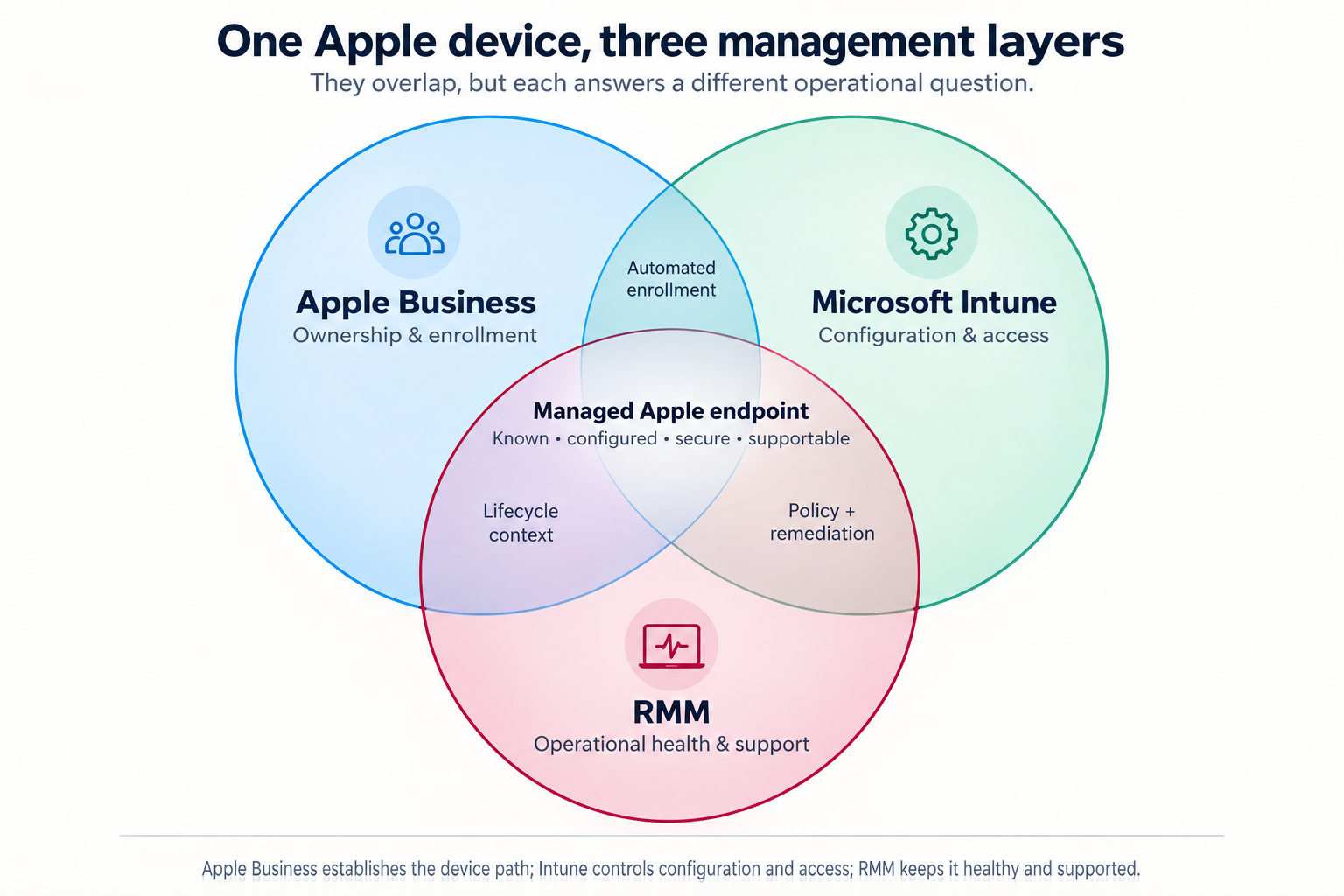
The important distinction is that Apple Business, Microsoft Intune, and an RMM can all touch the same Apple device—but they solve different problems.

Apple Business, Microsoft Intune, and RMM Venn diagram
The overlaps are conceptual; they do not mean every product has a direct technical integration with every other product.

*The overlaps in this diagram are conceptual. They do not mean every product has a direct technical integration with every other product.*

Apple Business: ownership, identity, and the enrollment path

Apple Business is the Apple-side organizational layer.

Its central role is to help the organization establish that a Mac, iPhone, or iPad is company equipment and direct it into an approved management process. Depending on the organization’s Apple configuration, its functions can include:

  • Assigning eligible devices purchased through Apple or participating resellers
  • Directing devices to a mobile-device-management service through Automated Device Enrollment
  • Managing organization roles and Managed Apple Accounts
  • Acquiring and assigning Apple apps and books
  • Connecting Apple identities with the organization’s identity environment
  • Apple Business answers:

    Does this device belong to the company, and where should it enter management?

    That is essential when a device is first issued, replaced, reassigned, lost, or retired. It reduces the chance that the business discovers too late that a “company Mac” is still effectively tied to a former employee’s personal Apple account.

    Apple Business may include Apple-native management capabilities depending on the subscription and configuration. But in a Microsoft 365-centered environment, it is usually best understood as the Apple ownership and enrollment foundation—not the complete answer to endpoint security or day-to-day support.

    Microsoft Intune: configuration, security, and access

    Microsoft Intune is a cloud endpoint-management service. Microsoft says it can enroll, configure, secure, and update devices; deploy and protect applications; and use compliance status in access decisions. It supports macOS, iOS, and iPadOS alongside Windows and other platforms. Microsoft’s Intune overview explains its connection to Entra ID and Conditional Access.

    For Apple devices, Intune can commonly handle:

  • Device-enrollment profiles and configuration policies
  • Encryption, password, screen-lock, and operating-system requirements
  • Deployment of business applications and settings
  • Compliance reporting
  • Certificates, Wi-Fi, VPN, and security configuration
  • Restrictions on device features or data sharing where appropriate
  • Conditional Access decisions for Microsoft 365 resources
  • Mobile application management for work data on personally owned devices
  • Intune answers:

    What must be true before this device can use company information?

    That question matters most when an employee signs in to Microsoft 365 from a Mac, iPhone, or iPad. Intune can help ensure the device meets the organization’s requirements before it reaches email, SharePoint, Teams, or other business systems.

    RMM: operational health and support

    An RMM—remote monitoring and management platform—is the operational layer. Exact features depend on the RMM product and the way an IT provider configures it, but its everyday responsibilities often include:

  • Monitoring device health, storage, performance, and alerts
  • Deploying patches or helping confirm patch status
  • Running maintenance and remediation scripts
  • Providing remote support
  • Maintaining hardware and software inventory
  • Generating service tickets and operational history
  • Identifying a recurring issue before it becomes another user complaint
  • An RMM answers:

    Is this device healthy, current, visible, and supportable today?

    Intune can perform some endpoint-management and remediation functions that overlap with an RMM. An RMM can report on conditions that matter to a compliance policy. The difference is emphasis: Intune is generally the stronger Microsoft identity, policy, and access-control layer; an RMM is generally the stronger ongoing service-operations layer.

    Where the overlap matters

    The systems should reinforce one another, not compete.

    | Overlap | Useful outcome | Decision to make |
    | ———————– | ———————————————————– | ——————————————————————————- |
    | Apple Business + Intune | Zero-touch enrollment and supervised device setup | Which MDM service receives Apple devices automatically? |
    | Intune + RMM | Security policy plus monitoring, remediation, and support | Which tool owns patching, and which one opens the ticket when it fails? |
    | Apple Business + RMM | Better asset and lifecycle context | Which system is the trusted record of company ownership? |
    | All three | A device that is known, configured, secure, and supportable | Who owns the full lifecycle when the employee leaves or the device is replaced? |

    The most common mistake is not selecting the “wrong” product. It is allowing two systems to be responsible for the same control—or assuming that one system handles a job it does not.

    For example, if Intune and the RMM both try to govern operating-system updates, the result can be conflicting timing, unclear reporting, or a support team unable to say which system failed. If Apple Business assigns a device but nobody verifies that Intune enrolled it, the company may own equipment that never entered its security baseline.

    A practical division of responsibility

    For many small and midsize organizations using Microsoft 365, a sensible model looks like this:

  • Apple Business: establish company ownership, Apple identities, app licensing, and automated enrollment.
  • Intune: apply device configuration, security standards, application controls, and Microsoft 365 access requirements.
  • RMM: monitor health, automate routine maintenance, deliver support, and preserve operational history.
  • The details will vary. A company with only a few iPhones may need a lighter model. A professional-services firm with managed Macs, remote employees, regulated information, and Microsoft 365 may need all three layers working together.

    The goal is not to collect dashboards. It is to make sure a business-owned Apple device has a clear path from purchase, to enrollment, to secure use, to support, to retirement.

    Ask about any company Mac, iPhone, or iPad:

  • Can we prove it belongs to us?
  • Can we confirm it meets our access and security requirements?
  • Can we see whether it is healthy and support the person using it?
  • Can we recover or retire it without depending on one employee’s memory?
  • If those questions have clear answers, the device is managed.

    If the answer is, “We have an Apple portal somewhere, and our IT company can probably see it,” the organization may have software—but not yet a device-management model.

    Permalink

    Assorted Links — September 14, 2026

    A cyber incident can be contained without being understood immediately

    NovoCure’s September 1 filing says a subsidiary found unauthorized access in mid-August, activated its response plan, and was still investigating exposed information. The filing says medical treatment devices were not accessed and systems remained functional. It is a useful incident-reading lesson: describe what is known, what is protected, and what remains under review.

    Hardware security is becoming a lifecycle problem

    NIST’s new workshop report describes priorities spanning chip design, manufacturing, deployment, operation, and end of life. Provenance, attestation, software bills of materials, and traceability appear together because a secure component is not enough if nobody can explain where it came from or what happened to it later.

    A data center now arrives with a public balance sheet

    Canada’s responsible-data-center principles ask projects to account for electricity ratepayers, water use, and lasting local benefits. The framework is not a universal rulebook, but it captures a practical shift: compute capacity is infrastructure with physical inputs and community consequences, not an invisible cloud abstraction.

    Digital resilience includes the things that are not called cyber

    Singapore introduced a bill covering the security and resilience of major cloud services and data centers, including power, cooling, fire, and other operational failures. It is a useful reminder for smaller organizations too: an incident plan that names malware but not dependencies is not yet a resilience plan.

    NASA’s new X-ray objects are a reminder that discovery starts as a puzzle

    NASA’s September science roundup highlights Chandra observations of mysterious X-ray objects alongside other current work. A compelling scientific result does not always arrive as an answer; sometimes it is a new object or signal that makes the next observation worth doing.

    An AI cyber-defense pilot starts with constrained work

    The Center for Internet Security announced a pilot with state and local organizations to examine whether AI can help identify, validate, and prioritize defensive findings. The interesting boundary is the work being tested: assisting established controls and remediation decisions, not handing an unattended system the authority to run security.

    AI operations still have to earn trust from the people on call

    NTT DATA says it is expanding an AI-powered infrastructure-operations platform using monitoring, predictive analytics, and automation. The vendor’s claims are not independent performance evidence, but the operational question is useful: an AI system becomes part of support only when people can see what it noticed, why it acted, and how to correct it.

    Space technology is also a story about the systems behind the mission

    NASA’s Discovery Days program uses hands-on exhibits to show how power, propulsion, communications, and materials support Artemis work. The event is aimed at the public, but the underlying idea travels well: visible products depend on layers of specialized infrastructure that usually stay out of sight.

    Permalink

    Assorted Links — September 12, 2026

    This week: the invisible work behind infrastructure, maps, measurements, and machines that refuse to be simple.

    Planning a Grid With Too Many Possibilities

    The Department of Energy says its GridFM 2.0 research project aims to help utilities evaluate up to 1 billion grid scenarios in 24 hours. Those are project goals, not achieved results. The interesting part is the bottleneck being named: infrastructure planning increasingly depends on comparing possibilities before the real-world queue gets longer.

    A Highway Corridor Is Also a Utility Corridor

    The Transportation Department’s America’s Great Corridors of Commerce initiative is seeking input on coordinating highways and rail routes with transmission, fiber, water, and other utilities. It is a useful reminder that infrastructure is rarely one thing. Right-of-way, permitting, financing, and maintenance often matter as much as the wire or pipe itself.

    A National Map Gets More Useful by Becoming Standard

    USGS released Version 2.0 of its Cooperative National Geologic Map on September 3, expanding standardized coverage to all 50 states and most U.S. territories. The quiet achievement is the shared format behind it: a national resource becomes more useful when people can compare, extend, and reuse the data.

    The Most Important Part May Be the Wiring

    NASA’s Titan-bound Dragonfly rotorcraft has received its electrical harness, carrying power and data among the vehicle’s systems. The harness does not get much credit for itself, which is precisely its charm. Plenty of critical systems are built to make other systems possible.

    Five Sensors See What One Could Not

    NASA researchers used five detectors to study a sporadic-E layer that can disrupt long-distance radio signals and found unexpected internal complexity. The result is enjoyable science and a durable measurement lesson: a clean reading from one point can describe only the point where it was taken.

    The Cold War’s Code Breaker Was a Specialized System

    IEEE Spectrum revisits the NSA’s Harvest system: a specialized high-speed processor attached to IBM’s Stretch computer. Its systems lesson is that computing performance comes from matching specialized hardware, general-purpose infrastructure, software, and people to a mission—not from the mainframe alone.

    A Digital Twin Meets the Real Airplane

    NASA’s X-59 quiet-supersonic aircraft has completed 25 test flights. Its team uses a real-time digital twin to compare flight data against simulated predictions—and so far, the aircraft’s behavior has closely matched the models. The useful engineering lesson is that a digital twin is not a decorative dashboard; its value arrives when the real world gets a chance to disagree.

    An Agent Needs Its Own Identity

    WorkOS announced Agent Auth in early access on September 2. Its stated alternative to a long-lived API key or borrowed user session is an agent identity with scoped, short-lived tokens and revocable sessions. The useful question is not whether an agent feels like an employee; it is whether the organization can say which identity made a call, for whom, and with what permission.

    Permalink